Version 2 Permissions filters are available in v1.32.13 and above.
The original advanced permissions filter was always intended to be a temporary solution until I had a chance to update the code to support a query language that would provide a more feature-rich query capability and greater flexibility on what information to match in the Security Descriptors. Unfortunately, as things do, it's taken a while to get the time to come back and update NetTools to write the new version. The trigger for me to complete the update was the discovery of the BadSuccessor vulnerability. With the v1 advanced filter, it wasn't possible to configure a filter to return all the possible scenarios in a single query.
The UI limits the original v1 advanced filter and what can be configured in a single query; there are only so many options that can be overloaded into a single checkbox. Hence, the introduction of the v2 Filter. This version uses a query language which has he ability to include multiple logic statements as well as nested logic evaluations.
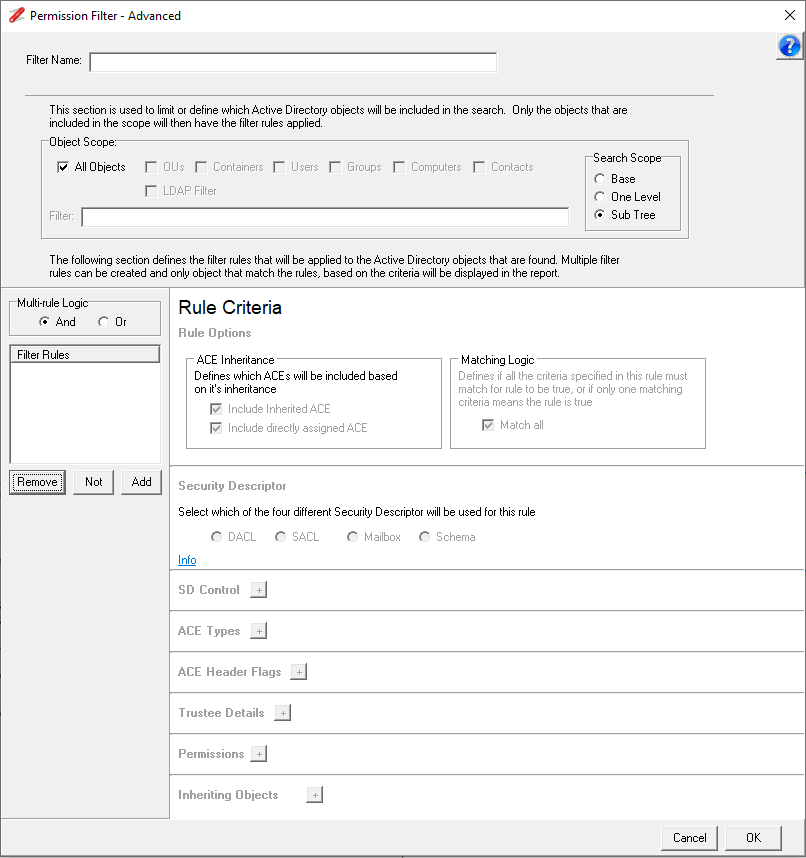

This does not mean that the v1 advanced filter is without its advantages. The v1 filter employs a different matching algorithm, which means that in some cases it has better optimisations and can be quicker than the v2 filter. For this reason, NetTools support both versions of the filters.
You can convert v1 filters to v2 filters using the convert button on the filter selection dialog. The v2 filters have a different icon to help differentiate them in the filter view.

The Convert button is only enabled when a v1 filter is selected. When pressed, a new instance of the filter is created with v2 attended.
If you want to create a v1 filter, when you click the Add Filter button, the user is presented with the option to create a basic filter (v1). Once saved, this can then be converted into a v1 advanced filter using the Advanced Filter button.